After switching from OpenCode to Pi, I kept typing the same command whenever an AI response went wrong:
/undoThen I would remember that Pi didn’t have it.
Sometimes the AI had made the wrong change. Sometimes I didn’t like the direction it took. And sometimes the problem wasn’t the AI at all—I simply hadn’t explained the task well enough.
In those moments, I didn’t want to fix the generated code. I wanted to return to the moment before I sent the prompt, rewrite it, and try again.
When I was using OpenCode, I didn’t think much about its /undo command. It was just there. But after using it for months, it had quietly become part of my workflow.
I didn’t realize how much I relied on it until I switched to Pi.
Pi terminal UI, from pi.dev.
The one feature I kept typing
I’ve written before about why I enjoy using Pi. I like its minimal design, how easy it is to customize, and the fact that I can add my own extensions instead of waiting for someone else to build them.
But after moving to Pi full time, my fingers kept reaching for /undo whenever a response went in the wrong direction.
At first, I assumed I would get used to working without it. Instead, I missed it almost every day—not because Pi made more mistakes, but because undoing had become the fastest way to correct my own thinking.
The same situations kept happening:
- The model misunderstood what I wanted.
- I changed my mind after seeing the result.
- The implementation revealed that my original prompt was incomplete.
Asking the AI to repair an unwanted implementation often meant adding more instructions on top of a bad starting point. It was usually faster to return to the previous state and ask again with a better prompt.
Building /undo
Eventually, I stopped wishing for the feature and started building it.
The behavior I wanted sounded simple:
- Create a checkpoint before every user prompt.
- Let Pi complete its response and modify the project.
- If I run
/undo, restore the project and conversation to that checkpoint. - Put my original prompt back into the editor so I can revise it.
From my perspective, it should feel as though the last exchange never happened. The response disappears, the code returns to its earlier state, and my prompt is waiting for me.
I can change a few words, press Enter, and continue working.
That small loop made Pi feel much closer to the workflow I was already used to.
While testing, I found another problem
After finishing /undo, I tested it repeatedly: make a change, undo it, adjust the prompt, and try again.
Then I noticed that I didn’t always want to undo the latest prompt. Sometimes the direction had gone wrong several prompts earlier.
Imagine a session like this:
Prompt #1
Build the component.

↓

Prompt #2
Refactor the layout.

↓

Prompt #3
Improve the animation.

↓

Prompt #4
Integrate another feature.

↓

Prompt #5
Actually...

Version #2 was better.
By Prompt #5, the latest response wasn’t the real problem. The session had taken a wrong turn three prompts ago.
One-step undo could not solve that cleanly.
That’s how /rewind happened
Instead of only restoring the latest checkpoint, I added another command:
/rewindIt shows my last 15 user prompts. I select one, and the extension restores the matching code state and jumps back to that point in the conversation. The selected prompt is placed in the editor, ready to edit or resend.
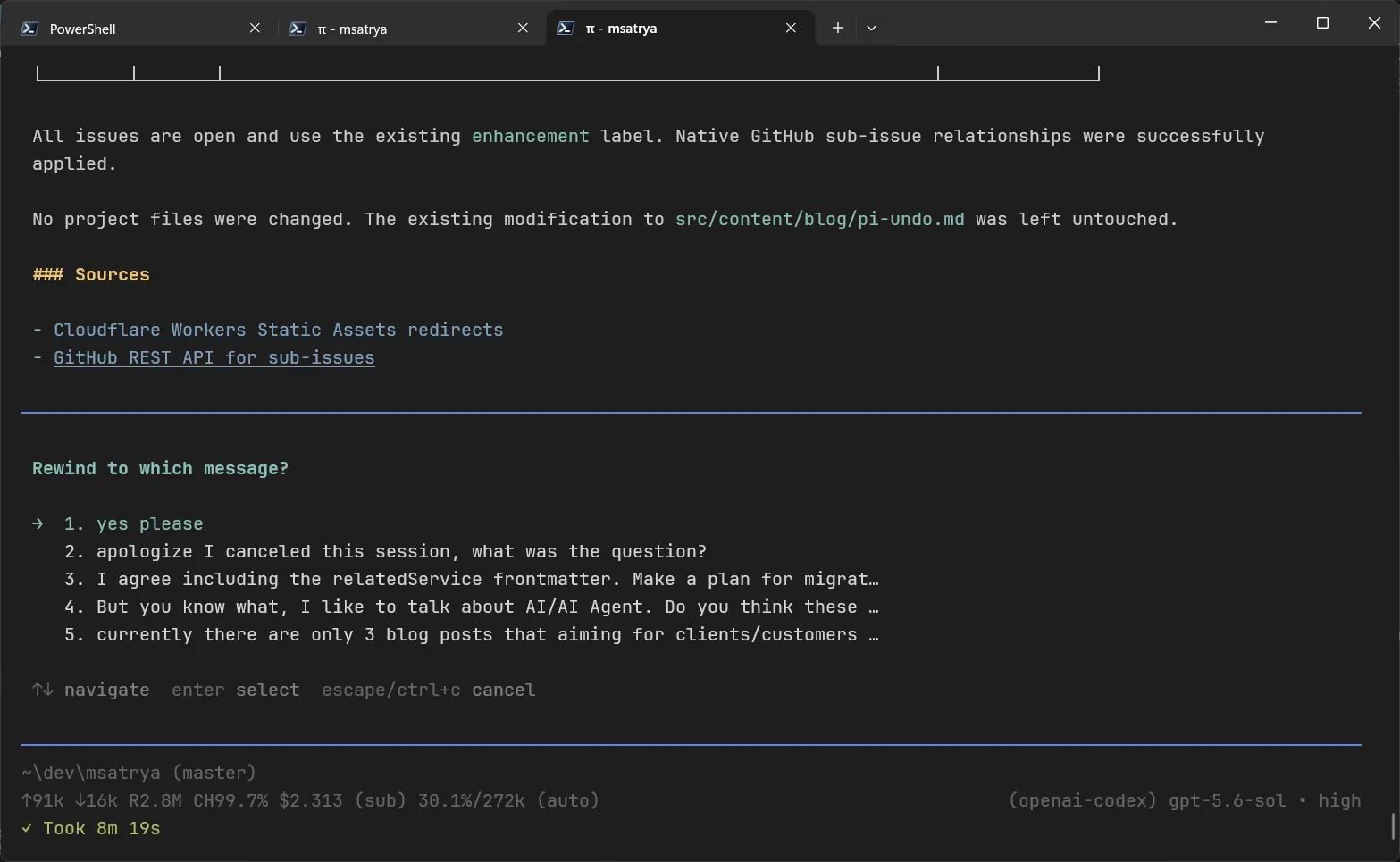
/rewind extension in action
Ironically, I now use /rewind more than /undo. I originally thought it would be a nice extra feature, but it became the more useful command because it lets me reconsider an entire direction instead of only the latest response.
The hardest part wasn’t the command
The commands themselves weren’t particularly difficult. Making restoration safe took much longer.
A useful checkpoint has to account for more than ordinary tracked-file changes. I wanted the extension to preserve and restore:
- modifications to tracked files
- staged changes
- untracked files
- the matching point in the conversation
It also refuses to restore a checkpoint onto a different Git commit. A checkpoint belongs to the repository state where it was created; applying it somewhere else could overwrite unrelated work or produce a misleading result.
Before restoring anything, the extension creates a safety backup of the current working tree. If restoration fails, it uses that backup to recover the state from before the command ran instead of leaving the project half restored.
Most of the implementation isn’t about navigating backward. It’s about making sure that doing so doesn’t lose the user’s work.
Those edge cases took much more time than I expected, but they are also what made the extension useful enough for my daily workflow.
One small extension that changed my workflow
This isn’t an extension I use every hour. Some days, I don’t use it at all.
But whenever an AI response goes in the wrong direction, I no longer think about Git commands, resetting files, or scrolling through conversation history. I go back, improve the prompt, and continue.
Looking back, that is probably what I missed most after moving from OpenCode to Pi. Not because OpenCode necessarily had a better implementation, but because my workflow had already adapted around the ability to undo.
Now Pi has it too. And thanks to /rewind, it does more than I originally planned.
The funny part is that I started this project because I missed one command.
I finished it with two.
You can find the extension, installation instructions, and implementation details on GitHub.